模型解析 · 定位与价格 · 最后更新 2026-08-28

GPT Image 2:定位、特点与价格

GPT Image 2 是 OpenAI 当前能力最强的图片生成与编辑模型,面向需要更高成片质量、更可靠文字排版、更复杂构图以及高保真修改的生产型任务。本文不比较不同 API,而是集中说明这个模型擅长什么、如何收费,以及什么情况下值得选择它。

先看定位:它属于什么级别?

OpenAI 在面向普通用户的 ChatGPT 产品中使用“ChatGPT Images 2.0”,在开发者 API 中使用模型名“gpt-image-2”。网上常见的 ChatGPT Image 2、GPT Image 2.0 等写法通常指向同一代图片能力,但写文章和引用文档时,最好保留官方名称。

定位:OpenAI 旗舰图片模型 · 重点:高质量生成 + 高保真编辑 · 发布:2026-04-21

GPT Image 2 是什么?

GPT Image 2 是 OpenAI 用于图片生成与编辑的旗舰图片模型。官方模型页将它描述为面向快速、高质量生成和编辑的先进模型,支持文本输入、图片输入与图片输出,也支持灵活尺寸和高保真参考图。

模型名称

gpt-image-2

官方定位

面向新项目的默认推荐模型,优先考虑成片质量、编辑可靠性和减少返工次数。

最适合

写实图片、含文字设计、复杂构图、合成与身份敏感型编辑。

质量选项

low · medium · high · auto

常用格式

PNG · JPEG · WebP

固定快照

gpt-image-2-2026-04-21

从官方提示词指南看,它擅长什么?

1. 图片内文字与排版更可靠

OpenAI 官方提示词指南把清晰文字、一致布局和强对比列为 GPT Image 2 的重点能力。它更适合需要标题、标签、说明文字和信息层级的图片,例如广告海报、信息图、菜单、包装和教学图解。需要密集文字或复杂布局时,官方建议优先使用 high 质量。

2. 更擅长复杂和结构化视觉

模型不仅需要理解“画什么”,还要理解元素之间如何组织。官方指南特别提到信息图、图表、多面板构图和标签图解。这意味着提示词可以更明确地安排主体数量、位置、阅读顺序、留白和文字区域。

3. 高保真图片编辑

在图片编辑和参考图工作流中,GPT Image 2 会自动以高保真方式处理所有输入图片。适合保留人物身份、更换环境、修改光线、替换产品背景、组合多张商品参考图,以及在不破坏主体结构的情况下进行风格转换。代价是参考图会增加图片输入 Token。

4. 风格控制与真实世界知识

官方提示词指南强调精确风格控制、风格迁移和真实世界知识。对于产品、建筑、交通工具、特定环境以及包含物理关系的场景,模型不仅匹配视觉风格,也会尝试保持对象和场景之间的合理关系。

支持哪些图片尺寸?

GPT Image 2 支持大量自定义分辨率。常用尺寸包括:

1024×1024 · 1536×1024 · 1024×1536 · 2048×2048 · 2048×1152 · 3840×2160 · 2160×3840

方形图通常生成得更快。草稿、缩略图和快速迭代可以先用 low;正式海报和复杂文字可考虑 medium 或 high。

GPT Image 2 API 怎么收费?

API 按 Token 计费,总费用由提示词文本输入、参考图片输入和最终图片输出共同组成。当前官方标准价格如下:

类型输入缓存输入输出
图片 Token$8 / 1M$2 / 1M$30 / 1M
文本 Token$5 / 1M$1.25 / 1M—

官方计算器给出的常用尺寸图片输出费用如下,不包含提示词和参考图片输入费用:

尺寸LowMediumHigh
1024×1024$0.006$0.053$0.211
1024×1536$0.005$0.041$0.165
1536×1024$0.005$0.041$0.165

Low

适合构图草稿、批量探索和速度优先的工作。单张成本最低,可以先确认方向再升级质量。

Medium

适合大多数正式配图、社交媒体视觉和常规产品图,是质量、速度与价格之间更均衡的选择。

High

适合密集文字、复杂版式、写实材质和最终交付图。价格明显更高,应留给真正依赖细节的画面。

因此,价格不能只看“生成一张图多少钱”。如果 Low 需要反复重做,而 Medium 一次就得到可用结果,后者的实际成本反而可能更低。官方也把“减少重试次数”列为选择 GPT Image 2 的理由之一。

最适合哪些图片任务?

提示词怎么写更稳定?

GPT Image 2 更适合清楚、完整的自然语言说明,而不是无序堆叠风格词。可以继续使用本站的通用图片公式:

[图片用途] + [主体] + [动作或状态] + [环境] + [构图与视角] + [光影] + [色彩] + [风格或媒介] + [细节] + [限制条件]

如果是编辑任务,应明确写出“必须保留什么”“只修改什么”和“不能改变什么”。如果图片包含文字,最好把需要出现的文字原样写出,并说明语言、位置、字号层级、对齐和对比度。

同一画面:完整提示词 vs 精简提示词

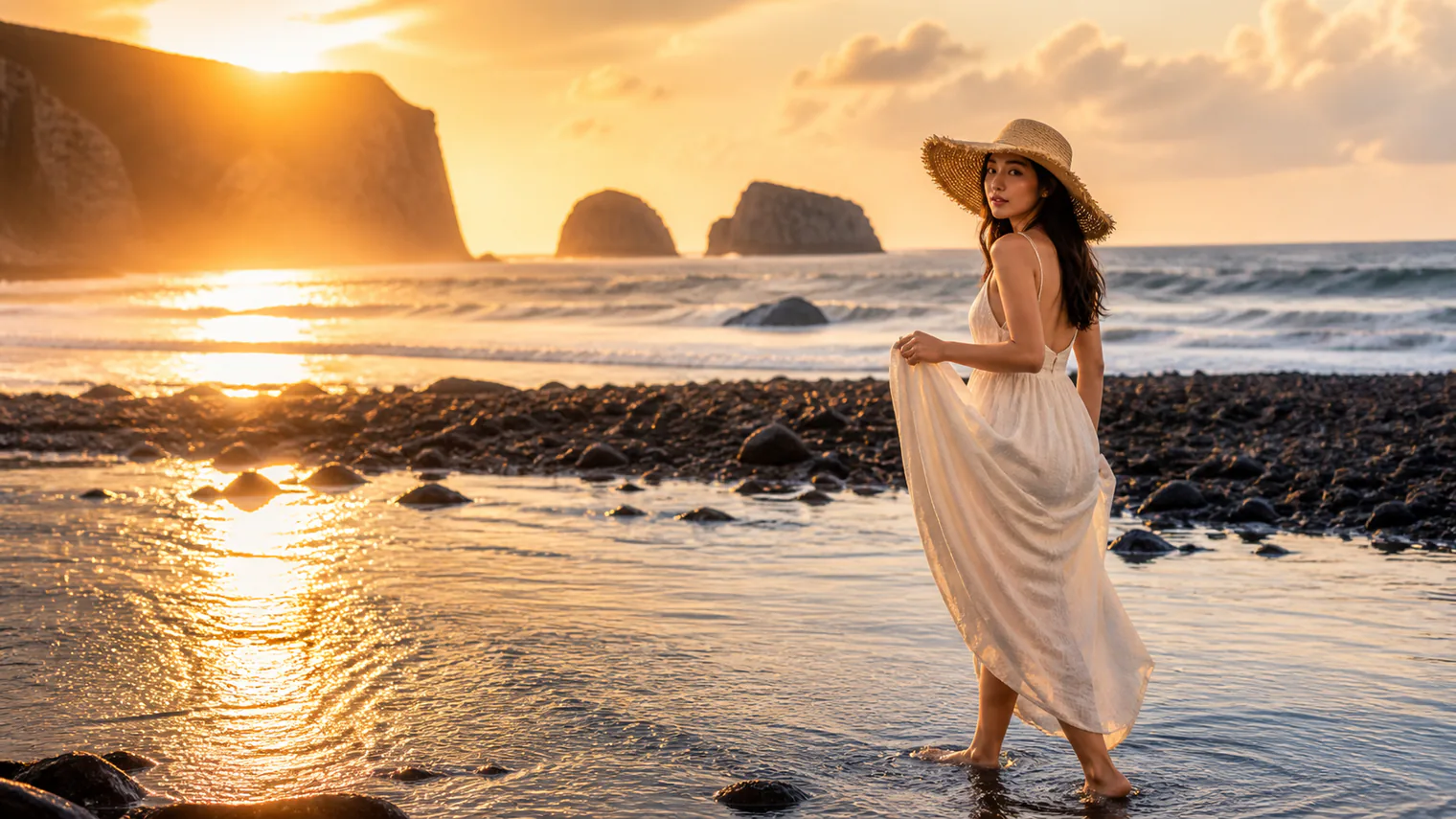
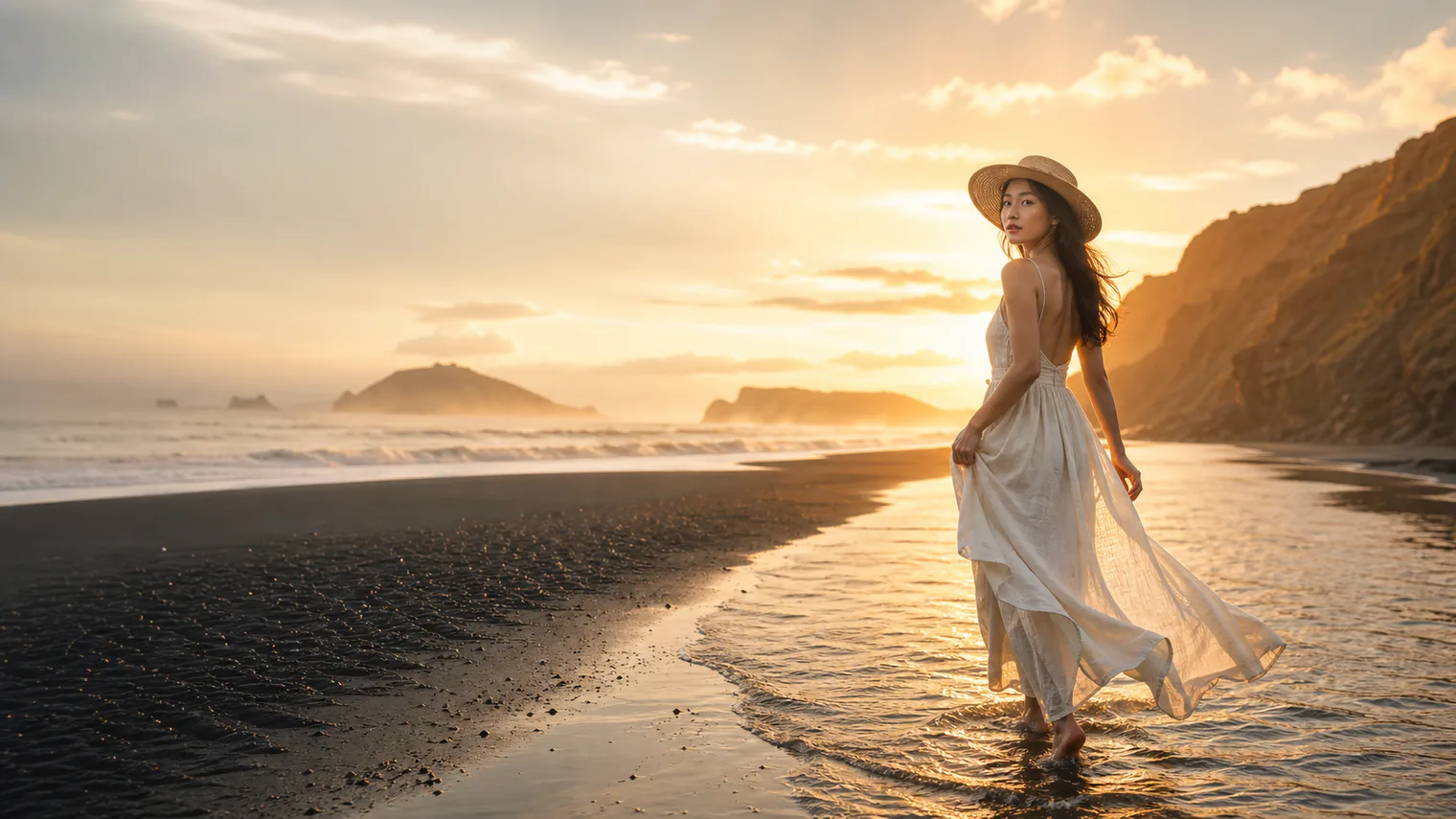
下面两张图使用同一模型、16:9 比例和相同主题生成。完整版明确了构图、光影、材质和限制条件;精简版只保留了会明显影响画面的核心信息。

查看完整提示词
Create a cinematic travel poster for a high-end editorial feature, with generous clean negative space on the left for a headline and a short introduction. An adult East Asian woman with natural facial features, dark eyes, and long black hair wears an ivory linen maxi dress and a wide-brimmed straw hat. She walks barefoot through shallow seawater, gently lifting one side of her dress and naturally looking back toward the camera. The scene takes place on a black volcanic beach at sunset, with steep coastal cliffs, rolling waves, and distant islands partially covered by delicate sea mist. Use a strict 16:9 horizontal full-body wide shot at eye level. Position the woman on the right third of the frame, leaving a large uncluttered area on the left. Let the coastline extend diagonally from the lower left toward the upper right, creating a natural leading line and emphasizing the width and depth of the landscape. The setting sun shines through thin clouds behind the woman, creating a soft golden rim light around her silhouette. Long, subtle reflections stretch across the wet sand and shallow water. Use a restrained palette of deep ocean blue, volcanic black, warm ivory, and golden amber, accented with small amounts of desaturated teal. High-end photorealistic cinematic photography with the visual quality of a luxury travel magazine, independent film poster, and fine-art photography exhibition. Show realistic linen fabric texture, the dress moving gently in the sea breeze, footprints in wet sand, shallow water surrounding her ankles, delicate atmospheric mist, suspended droplets, and natural skin and hair texture. Maintain authentic and natural East Asian facial characteristics without exaggeration or stereotyping. Preserve realistic body proportions and anatomically correct hands and feet. No additional people, boats, buildings, decorative text, logos, or watermarks. Avoid excessive HDR, oversaturated or fluorescent colors, heavy filters, artificial skin smoothing, exaggerated poses, plastic CGI texture, cartoon styling, or overly Westernized facial features.
查看精简提示词
Create a high-end cinematic travel photograph in a 16:9 horizontal composition. An adult East Asian woman with natural facial features, wearing an ivory linen maxi dress and a wide-brimmed straw hat, walks barefoot through shallow water on a black volcanic beach at sunset. She gently lifts her dress and looks back toward the camera. Place her on the right third of the frame and leave generous clean negative space on the left. Include distant cliffs, rolling waves, islands, and soft sea mist. Use golden backlighting, realistic reflections, deep ocean blue, volcanic black, warm ivory, and amber tones. Photorealistic luxury travel magazine style with natural skin, realistic fabric and anatomically correct hands and feet. No additional people, text, logos, watermark, artificial skin smoothing, excessive HDR, or CGI appearance.
GPT Image 2比例:16:9 · 人物:东亚女性 · 场景:黑色火山沙滩日落
GPT Image 2 完整旅行摄影提示词效果,东亚女性在火山沙滩日落中行走
完整提示词构图更接近编辑海报:人物稳定位于右侧,左侧留白更干净,海岸线、轮廓光和布料质感更受控。
GPT Image 2 精简旅行摄影提示词效果,东亚女性在火山沙滩日落中行走
精简提示词生成更直接,人物和氛围仍然准确,但夕阳和悬崖占据左侧,标题留白不如完整版纯净。
对比结论

提示词不是越长越好。当画面需要预留文案位置、固定人物站位或精确控制光线时,完整版更稳定;只做风格探索或快速出图时,精简版通常已经足够。先写核心指令,再只为必须控制的变量增加细节。

限制与注意事项

结论:GPT Image 2 的优势在哪里?

GPT Image 2 的定位不是最低成本的大批量出图模型,而是面向成片质量、文字与布局、高保真编辑以及减少返工的旗舰选择。先用 Low 确认创意方向,大多数正式图片用 Medium;只有密集文字、复杂构图和最终交付图再使用 High,通常能获得更合理的成本结构。

OpenAI 官方资料

FAQ

GPT Image 2 和 ChatGPT Images 2.0 是同一个吗?

它们属于同一代图片能力,但名称对应不同使用场景:ChatGPT Images 2.0 是产品名称,gpt-image-2 是开发者 API 模型名。

GPT Image 2 支持图片编辑吗?

支持。可以编辑整张图片、使用遮罩修改局部区域,也可以组合多张参考图片。

应该选择 Low、Medium 还是 High?

草稿和快速迭代优先 Low;普通正式图片可用 Medium;密集文字、复杂版式或最终交付可考虑 High。