MODEL GUIDE · OFFICIAL SOURCES · UPDATED 2026-09-07
Seedream 5.0 Pro: Features, Prompting, and Best Use Cases
Seedream 5.0 Pro is ByteDance Seed’s multimodal image creation model for professional visual production. Beyond attractive generation, it emphasizes information organization, spatial understanding, local editing, realistic light, and multilingual typography. This guide draws on official launch materials, the model page, and Volcano Engine prompting guidance.
What is Seedream 5.0 Pro?
ByteDance Seed officially introduced Seedream 5.0 Pro on July 8, 2026. It is positioned as a multimodal image generation model with advanced reasoning, efficient content creation, and professional production capabilities. It places particular emphasis on design intent, spatial grounding, regional semantics, and complex information structure.
Position: professional multimodal image creation · Released: 2026-07-08 · Focus: generation + reasoning + precise editing + design production
Model
Seedream 5.0 Pro
Official position
Understand complex creative requirements and turn intent into production-ready visual content.
Core inputs
Natural language, reference images, selections, sketches, and other visual control signals.
Standout strengths
Infographics, spatially controlled editing, realistic light and materials, and multilingual text.
Four capabilities highlighted by ByteDance Seed
1. Complex information visualization
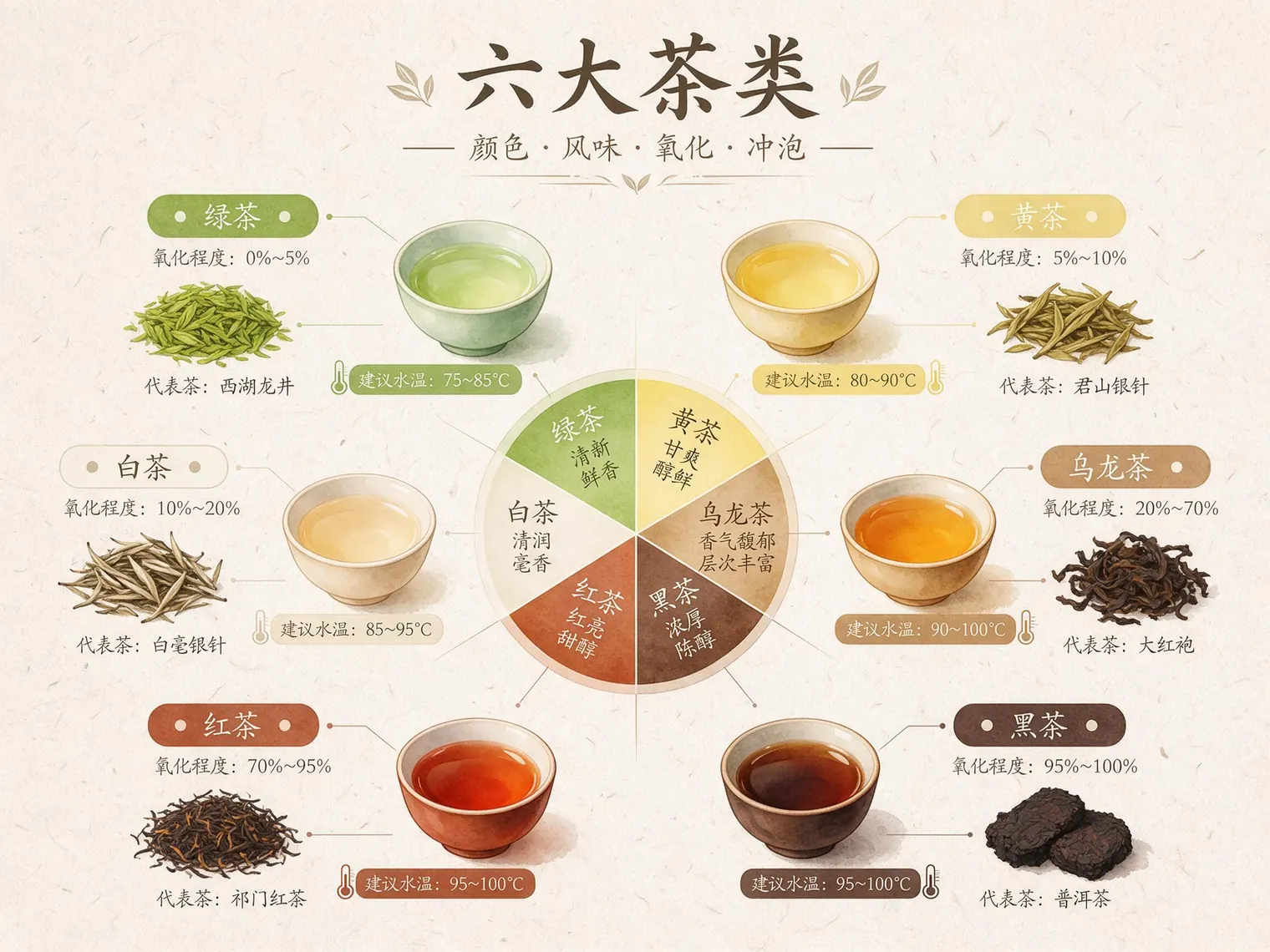
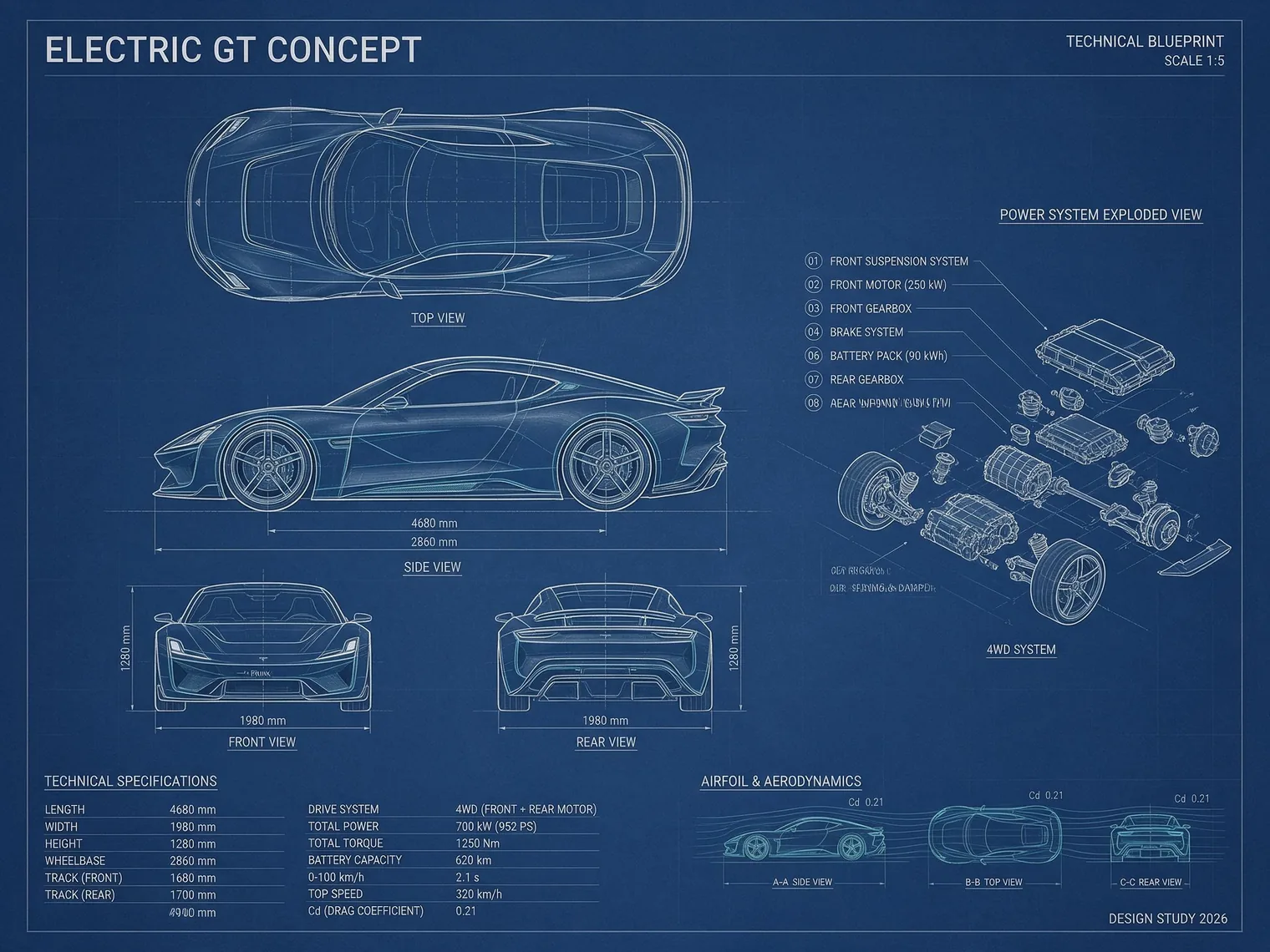
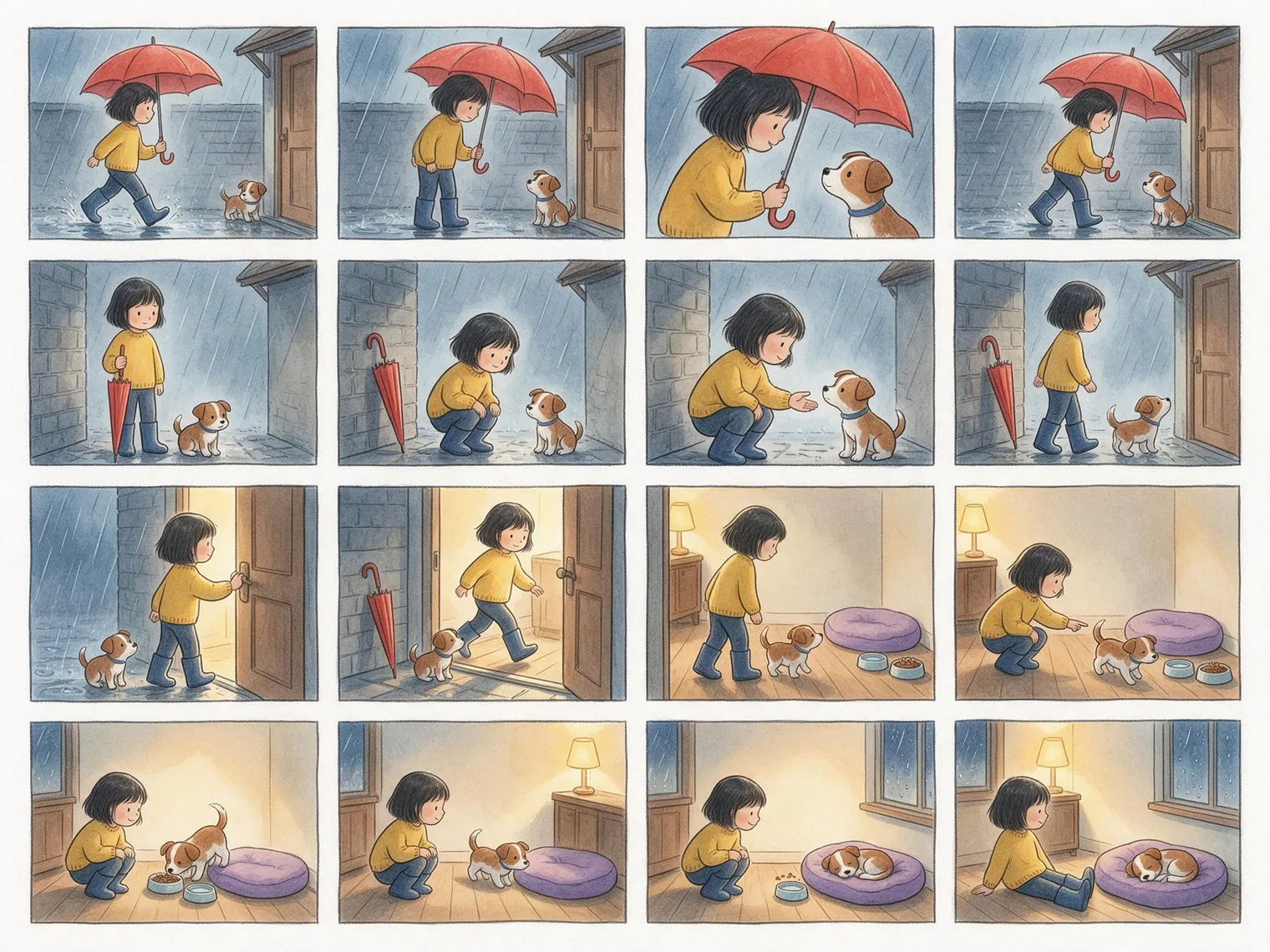
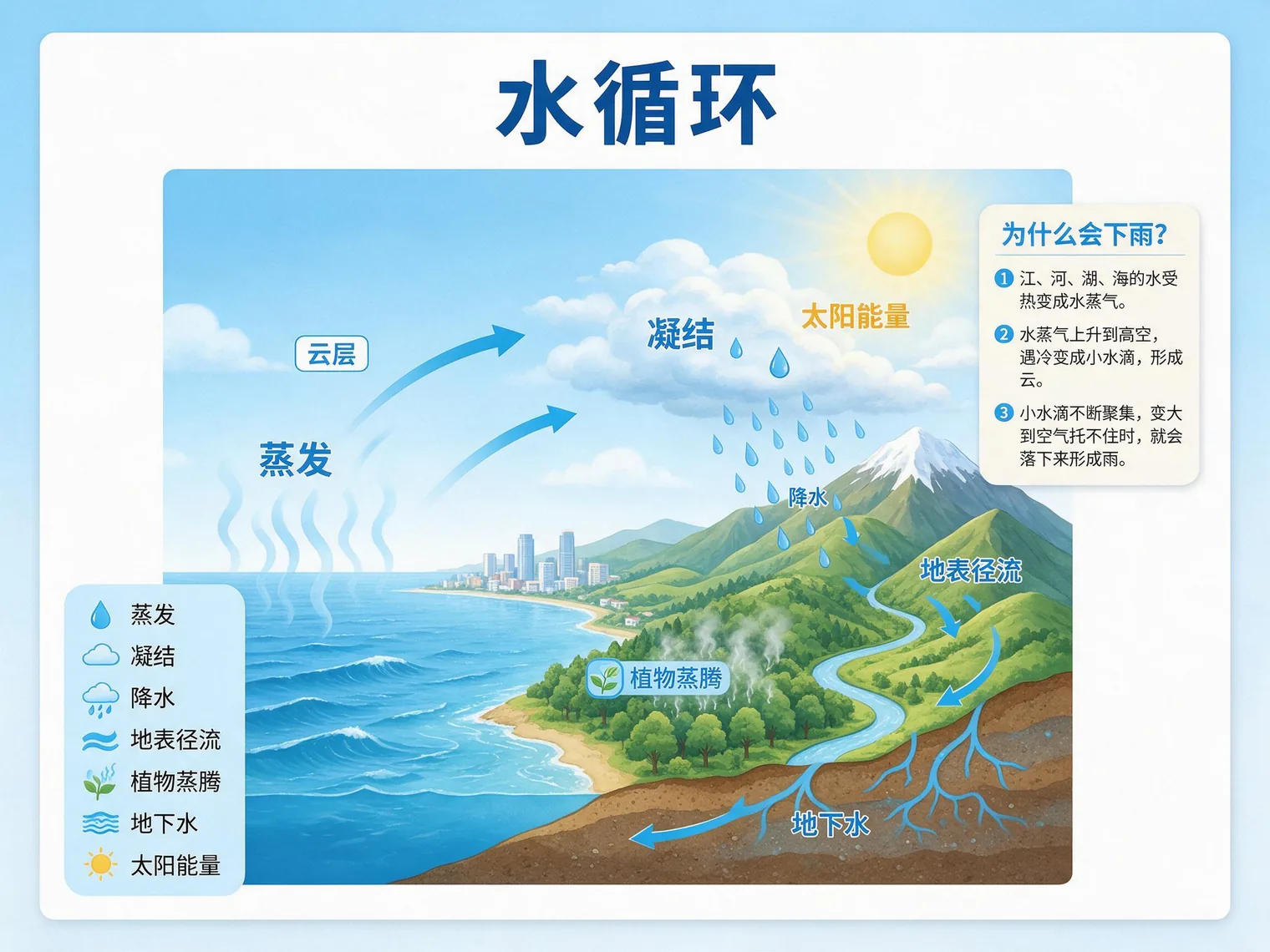
Seedream 5.0 Pro can organize data, concepts, and dense text into structured visuals. Official examples include tea infographics, automotive blueprints, 16-panel storyboards, and classroom posters. It is especially useful when a visual needs headings, charts, labels, sections, and a clear reading order.
Example: six tea categories infographic
Create a 4:3 horizontal educational infographic for tea beginners. Center a flavor wheel and arrange green, white, yellow, oolong, black, and dark tea around it. Give each tea a separate section connected to oxidation level, brewing temperature, and one representative variety. Use a pale rice-paper background, elegant low-saturation greens, amber, brown-red, and warm white, with botanical watercolor illustration and modern editorial information design. Add the clear title “SIX TEA CATEGORIES.” Keep all labels readable and accurate. No unrelated text, gibberish, logo, or watermark.
Seedream 5.0 Pro result: six tea categories flavor and brewing guide, 4:3.
Example: futuristic car technical blueprint
Create a 4:3 horizontal technical blueprint of a futuristic electric two-door GT for a design review. Use a deep-blue engineering-paper background with front, top, side, rear, and exploded powertrain views arranged on a strict grid; make the side view largest. Draw precise white and pale-cyan engineering lines. Label body length “4680 mm,” wheelbase “2860 mm,” and drag coefficient “Cd 0.21.” Add callouts for the battery pack, dual motors, suspension, brakes, and aerodynamic components. Use authentic industrial-design and CAD blueprint styling with consistent line weights, dimensions, sections, numbering, and engineering logic. Title: “ELECTRIC GT CONCEPT.” Bottom right: “DESIGN STUDY 2026.” No brand logo, gibberish, watermark, or people.
Seedream 5.0 Pro result: futuristic electric GT technical blueprint, 4:3.
Example: 16-panel film storyboard
Expand the full 16-panel storyboard prompt
Create a 4:3 landscape cinematic storyboard with exactly 16 equal landscape panels in a strict 4-by-4 grid, uniform thin borders and gutters. Read left to right, row by row. Row and column references below are placement instructions only: render no numbers, text, speech balloons or watermarks. Story: during one rainy evening, a girl finds a puppy sheltering outside her own house. It follows her inside and settles down. Everything happens within a few minutes, outside one doorway and in its adjoining entrance hall. Characters: the same round-faced girl with a short black bob, yellow sweater, dark-blue trousers and blue rain boots throughout; no backpack or raincoat. The same small short-haired brown-and-white puppy, brown ears, central white forehead stripe, white chest and blue collar; its head reaches only the middle of her calf. Show exactly this girl and this puppy clearly in every panel. Set: gray brick wall, brown front door on the right, overhead porch shelter. Indoors: wooden entrance-hall floor, warm lamp behind, one purple oval dog cushion and one water bowl and one food bowl already positioned against the right wall. Keep them in place. Prop continuity: one red umbrella with a curved handle. All four panels of row 1: her right hand visibly grips its shaft while it is open. Row 2 column 1: umbrella closed in her right hand. From row 2 column 2 onward: closed umbrella rests against the exterior gray wall and remains there whenever that spot is shown. She never carries the puppy; it walks. R1C1: medium wide, girl on left walks toward door on right under open umbrella; puppy sits under porch on right, both visible. R1C2: same side medium, she stops left of puppy and looks down; puppy looks up; umbrella open in hand. R1C3: closer two-shot, she leans toward puppy, still gripping umbrella; her face and entire puppy visible. R1C4: two-shot, she steps right under porch, puppy waits; open umbrella remains in her hand. R2C1: medium under porch, she holds closed umbrella vertically at her side; puppy beside her feet. R2C2: same camera, closed umbrella now leaning against left brick wall; girl crouches with empty hands; puppy in front to her right. R2C3: close two-shot, she offers one palm, puppy sniffs fingertips; other hand rests on her knee. R2C4: medium two-shot, she stands and turns right toward door; puppy stands facing same way; umbrella remains against wall. R3C1: side medium, she pushes brown door open with one hand; puppy waits beside feet; warm light inside. R3C2: same side wide, girl steps right through doorway, puppy follows directly behind; both visible. R3C3: interior medium, girl stands left looking back at arriving puppy; purple cushion and both bowls visible on right. R3C4: same camera, she crouches left and points to right food bowl; puppy walks toward bowl. R4C1: two-shot, puppy eats while girl watches from its left; water bowl and cushion stay in place. R4C2: same camera, puppy walks from bowl to purple cushion on right; girl stays in position watching. R4C3: two-shot, puppy curls on cushion; girl crouches smiling on left; both bowls stay beside cushion. R4C4: slightly wider ending, girl sits on floor left of cushion; puppy sleeps on cushion right; warm lamp behind, rainy night outside. Gentle watercolor and pencil linework, consistent character designs, stable cool exterior and warm interior lighting. Clear medium shots and two-shots, one action state per panel. Preserve scale, fur markings, costume and natural anatomy. No empty street or room shots, missing girl or puppy, floating umbrella, second umbrella, extra characters, costume changes, different bedding or change of time of day.
Seedream 5.0 Pro result: a 16-panel continuous rainy-night storyboard of a girl and a puppy, 4:3.
Example: classroom teaching poster
Create a 4:3 horizontal classroom teaching poster for middle-school science on the water cycle. Use a white and pale-blue background. Place a landscape cross-section from ocean and city to forest and mountains in the center, with consistent blue arrows forming a clockwise cycle. Add the title “THE WATER CYCLE.” Clearly label “EVAPORATION,” “CONDENSATION,” “PRECIPITATION,” and “SURFACE RUNOFF,” plus “PLANT TRANSPIRATION,” “GROUNDWATER,” “CLOUDS,” and “SOLAR ENERGY.” On the right, add a card titled “WHY DOES IT RAIN?” with three short, accurate steps. Modern textbook illustration combined with a clean flat-vector infographic, readable hierarchy, soft blue, green, and warm yellow. Keep the science accurate. No gibberish, logo, QR code, watermark, or unrelated decoration.
Seedream 5.0 Pro result: water cycle classroom poster in Chinese, 4:3.
2. Interactive precision editing
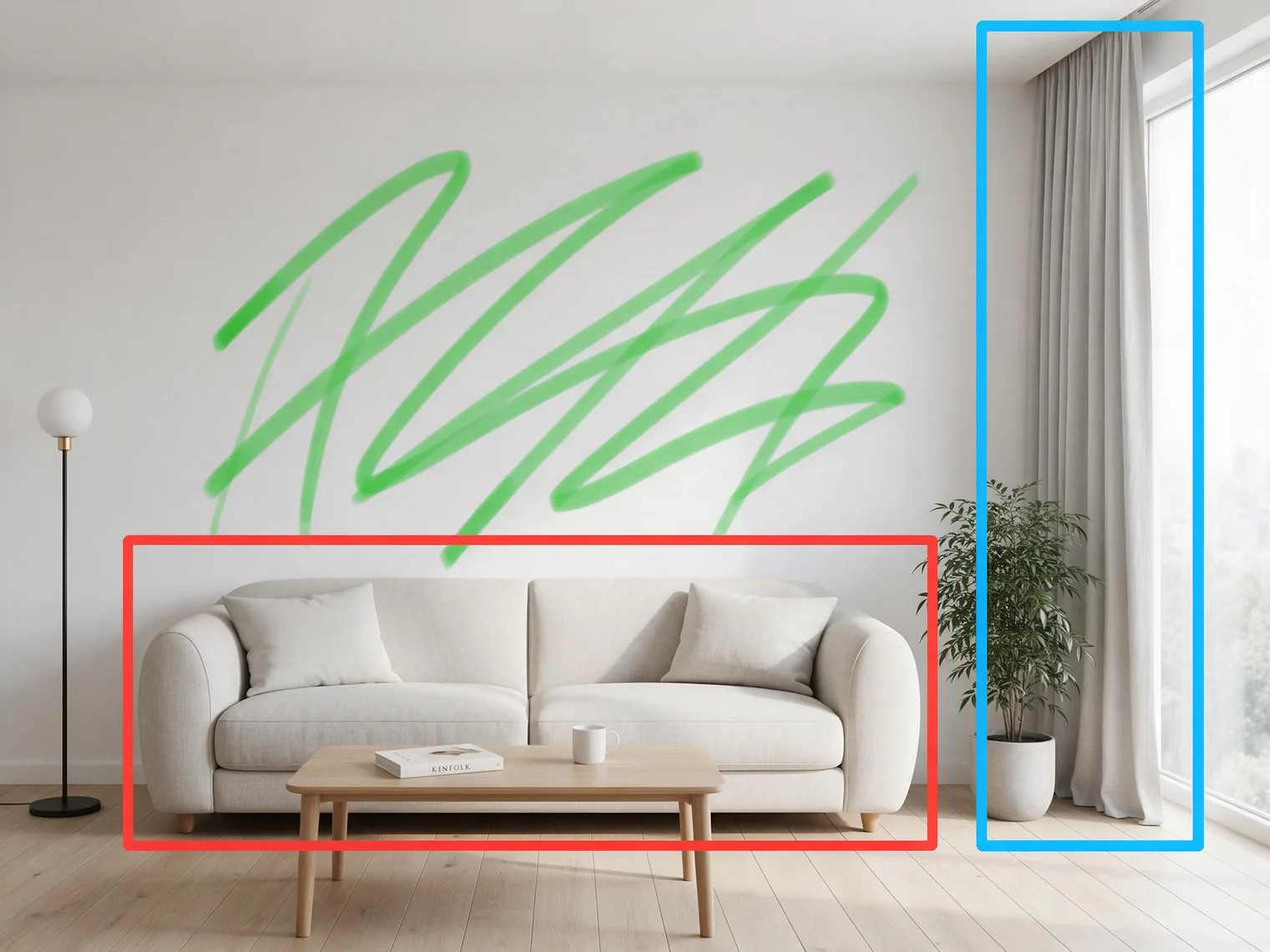
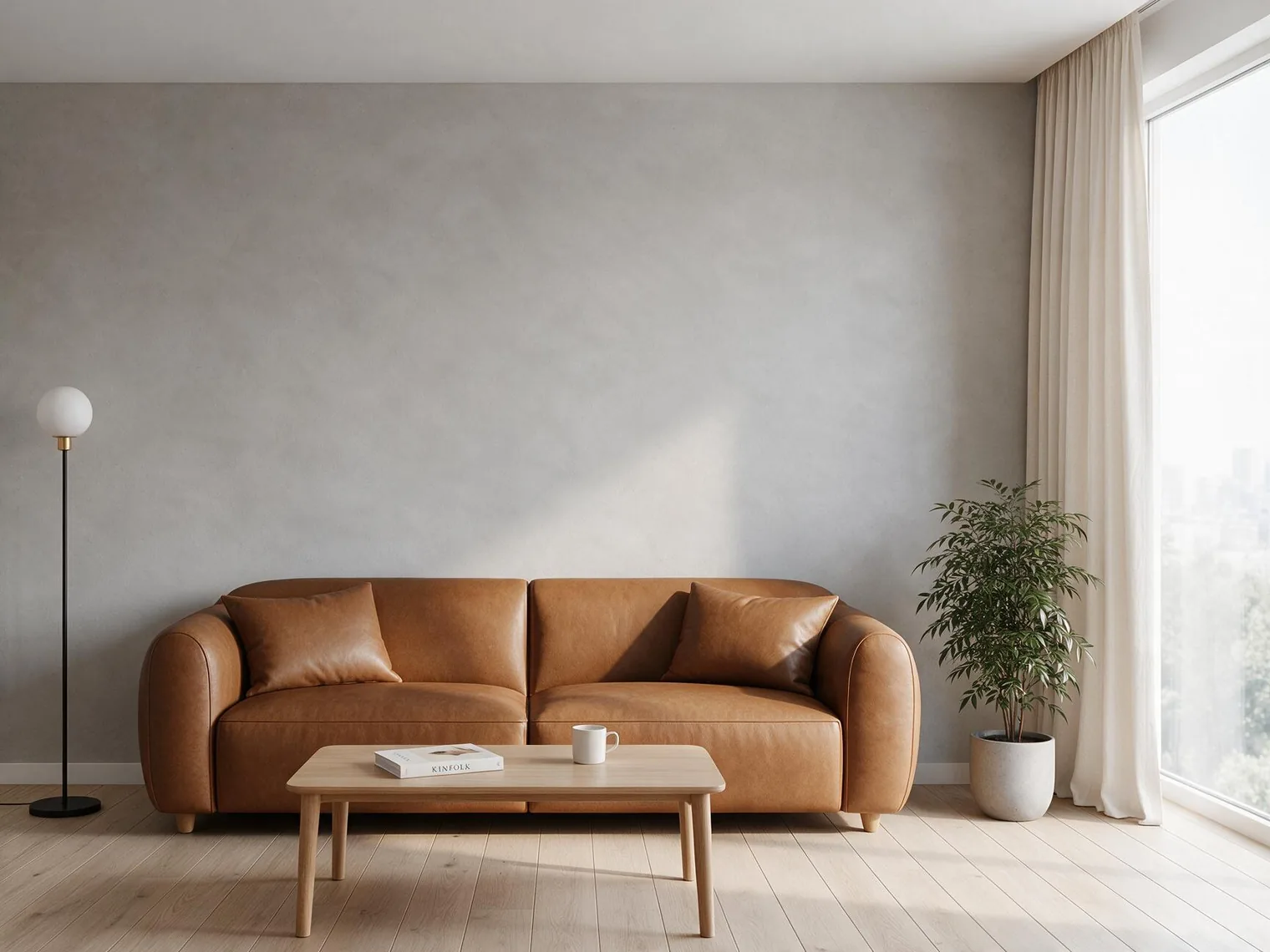
The model combines spatial grounding with regional semantics. In addition to text, creators can use points, lassos, boxes, sketches, and color annotations to specify where and how to edit. Official demonstrations include recoloring, material replacement, spatial reconstruction, multi-image fusion, and layer separation.
Example: edit a living room from color annotations
Upload a living-room photo, mark the sofa in red, curtains in blue, and wall in green, then use this instruction.
Output a 4:3 horizontal image. Edit only the color-annotated regions in the reference image. Replace the sofa inside the red box with a caramel-brown matte leather modular sofa while preserving size, perspective, and position. Replace the curtains inside the blue box with naturally draped warm-white linen. Change the green-marked wall to warm light-gray microcement. Match the original lighting and add realistic contact shadows, reflections, and folds. Outside the three marked regions, preserve the room structure, camera angle, furniture positions, floor, lights, exterior view, and composition. Do not add or remove other objects.
Edit reference: red marks the sofa, blue marks the curtains, and green marks the wall.Edit result: the marked sofa, curtains, and wall materials were replaced while preserving the original composition and furniture positions.
3. More realistic light, materials, and portraits
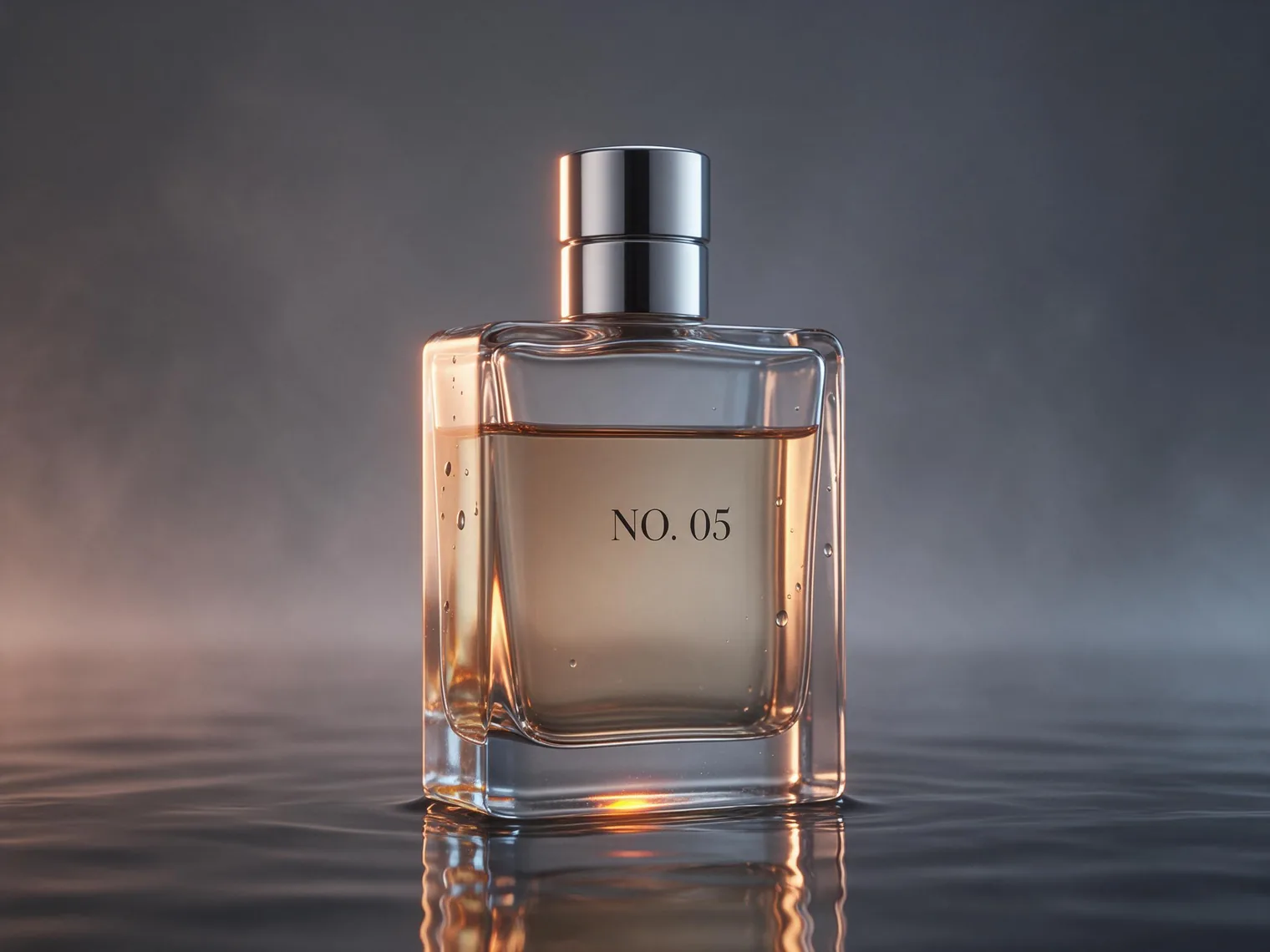
Official materials emphasize real-world lighting, material behavior, and skin texture. The model handles reflection, refraction, transmission, and contact shadows to make glass, metal, fabric, skin, and water feel more photographic.
Example: glass perfume commercial photography
Create a 4:3 horizontal luxury perfume campaign image. A transparent heavy-base glass perfume bottle stands in shallow water, filled with pale amber liquid and topped with a silver metal cap. The bottle carries only the clear text “NO. 05.” Use a minimal dark-gray dawn studio with light mist, centered medium-close framing from a slightly low angle. Add warm rim light from rear left passing through glass and liquid, plus soft cool fill from front right. Render physically convincing refraction, caustics, metal highlights, contact shadow, water reflection, glass thickness, and natural droplets. Photorealistic macro product photography. No extra label, distorted bottle, floating object, plastic texture, or watermark.
Seedream 5.0 Pro result: commercial glass perfume photography, 4:3.
4. Native multilingual prompting and text generation
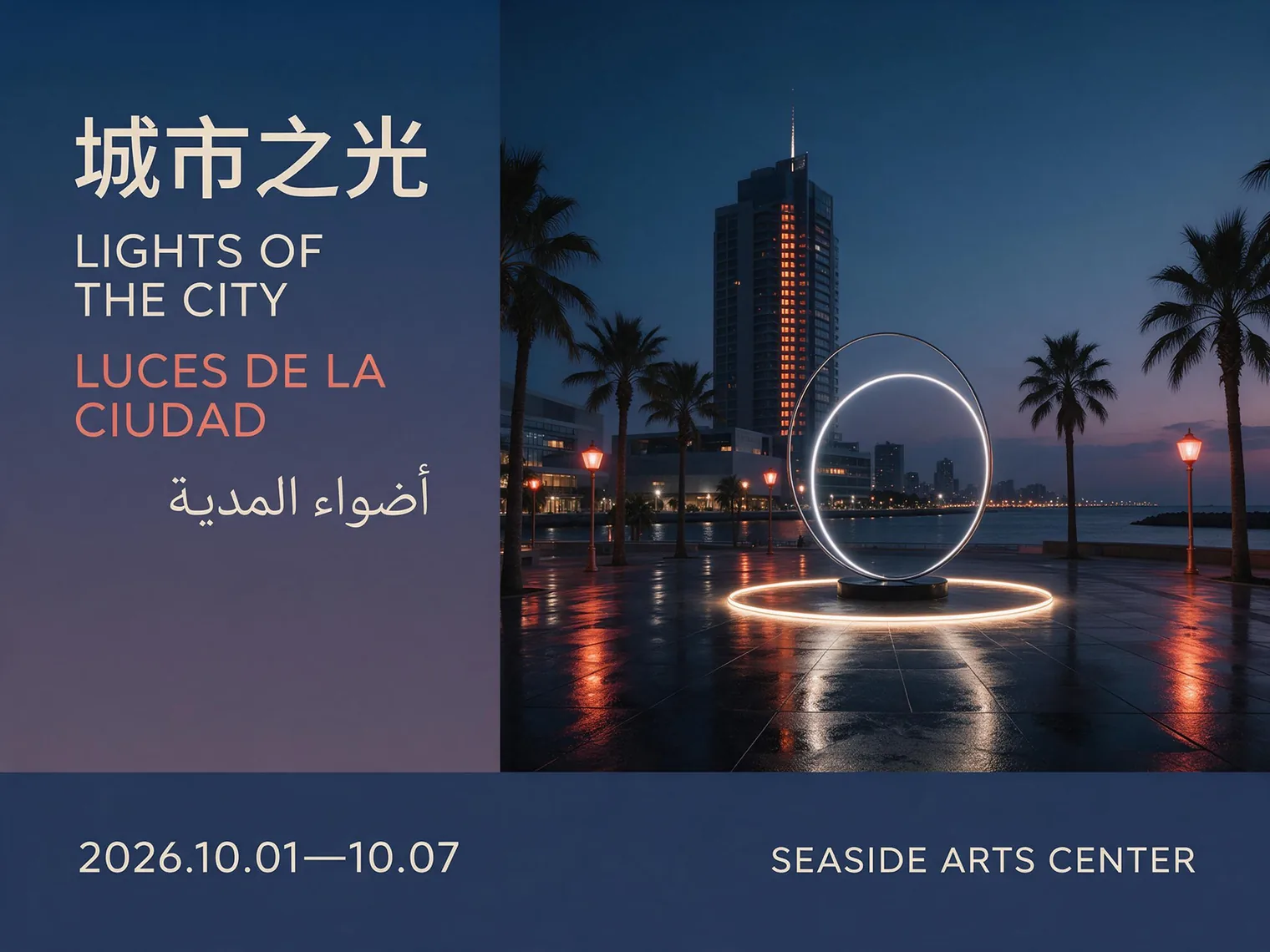
Seedream 5.0 Pro supports direct prompting and high-quality rendering in more than ten widely used languages. It also adapts to language-specific typography and regional visual conventions, including Chinese and English, Spanish accents, and right-to-left Arabic script.
Example: four-language city poster
Design a 4:3 horizontal international city culture festival poster. Show a coastal city square at night with modern architecture, palms, a distant sea, and a glowing circular public artwork. Use a clean poster grid with titles on the left, the main visual on the right, and event details across the bottom. Use blue-violet night tones with coral-orange light in a modern cultural-institution style combining Swiss grid design and city photography. Set four clear title lines: Chinese “城市之光,” English “LIGHTS OF THE CITY,” Spanish “LUCES DE LA CIUDAD,” and Arabic “أضواء المدينة.” Add “2026.10.01—10.07” and “SEASIDE ARTS CENTER” at the bottom. Keep Chinese and English left-aligned, preserve correct Spanish spelling, and set Arabic right-to-left and right-aligned. No other text, logo, QR code, or watermark.
Seedream 5.0 Pro result: four-language city travel poster, 4:3.
How to prompt Seedream 5.0 Pro
Volcano Engine’s official guidance recommends clear, connected natural language instead of repetitive style tags. Start with purpose and subject, then add action, environment, composition, lighting, and style. Put exact in-image copy in quotation marks. For edits, state what must remain, what alone should change, and what must not change.
[purpose] + [subject] + [action or state] + [environment] + [composition and camera] + [lighting] + [color] + [style or medium] + [details] + [constraints]
With multiple references, assign each image a role—for example, preserve the person from image one, use the clothing from image two, and follow the palette of image three. To retain layout, explicitly keep composition, subject scale, and background positions unchanged outside the selected area.
Infographics, educational posters, process diagrams, technical blueprints, and data visualization.
Marketing posters with precise headlines, labels, and multilingual typography.
Local edits and layout control guided by selections, annotations, or sketches.
Photorealistic portraits, product ads, material studies, and cinematic scenes.
Multi-reference fusion, character consistency, and coordinated visual sets.
Seedream 5.0 Pro vs 5.0 Lite
Both belong to the same Seedream generation but have different positioning. 5.0 Lite emphasizes multimodal understanding, visual reasoning, and search enhancement. 5.0 Pro goes further toward dense infographics, interactive precision editing, professional realism, and international design production. Do not apply Lite pricing or parameters directly to Pro.
Pricing and access
The official Seed model page provides trial and API access, but model names, availability, and billing can differ by platform and region. Volcano Engine publicly lists pricing for Seedream 5.0 Lite; that price should not be presented as Seedream 5.0 Pro pricing. Check the latest console and billing page linked from the official model page before production use.
Limitations and considerations
Dense infographics and text still require review, especially numbers, formulas, and small type.
Pixel-level edit consistency still has room to improve; inspect unselected regions after repeated edits.
Multilingual rendering is stronger, but brand names, prices, and legal copy must still be proofread.
Confirm usage rights when working with people, trademarks, or referenced creative work.
Conclusion: where Seedream 5.0 Pro stands out
Seedream 5.0 Pro is not simply about higher image quality. Its main value is bringing image generation closer to real design work: understanding complex information, controlling spatial position, editing through visual annotations, and handling realism alongside multilingual typography.
Yes. Multilingual text generation and complex information visualization are core capabilities, but headlines, numbers, and small copy should still be proofread.
Does Seedream 5.0 Pro support image editing?
Yes. Official examples show point, lasso, box, annotation and sketch guidance, color and material replacement, multi-image fusion, and layer separation.
Are longer prompts always better?
No. Official guidance favors clear, concise, connected natural language. Add detail when composition, typography, position, or preserved regions truly need control.